

TL;DR Browser agents have an amnesia problem. They re-discover every site from scratch on every run, paying the full discovery tax forever. Autobrowse fixes that by letting an agent iterate on a real task until it converges, then graduating the winning approach into a durable, reusable skill. That skill is memory the next agent, teammate, or customer can pick up and run without “re-learning” what's already been learned.
The genius without a hippocampus
If you've shipped a browser agent into production, you already know the shape of this problem.
The first run on a new site is exciting. The agent wanders around, figures out the page, eventually completes the task. The second run looks almost identical. The hundredth run is depressing. By then you've paid for the same exploration a hundred times, the cost graph is a straight line going up, and you still don't have a clean artifact you can hand to a teammate to say "this is how we do this job."
Real sites are messy. They render differently for different user agents, gate content behind JavaScript, hide the data you actually want behind an undocumented JSON endpoint, throw captchas when they don't recognize the session, and sometimes redesign their flow on a Tuesday. A generic agent loop copes with all of that fluently in the moment, then forgets everything once the session closes. The reasoning that solved Monday's problem evaporates along with the session.
The real bottleneck for browser agents in production is memory, in a form humans and agents can both read and trust. Reasoning has stopped being the constraint.
What is Autobrowse?
Autobrowse is a workflow that uses AI to improve AI. You give an agent a real task on a real site. It runs the task end to end, studies the trace it produced, iterates on its strategy, and keeps going until the workflow becomes reliable rather than lucky. Once it converges, it graduates the winning approach into a reusable skill: a markdown file plus the deterministic glue (CLI calls, fetches, selectors, helper scripts) needed to repeat the job.
This is similar to Karpathy's autoresearch harness, but for learning faster and cheaper browser skills. The first run is expensive on purpose, it's the run that pays for everything that comes after.
The artifact is the point. Every Autobrowse run produces a durable markdown file any future agent can load and execute, on top of whatever value you got from the run itself.
How it works:
The learning loop:
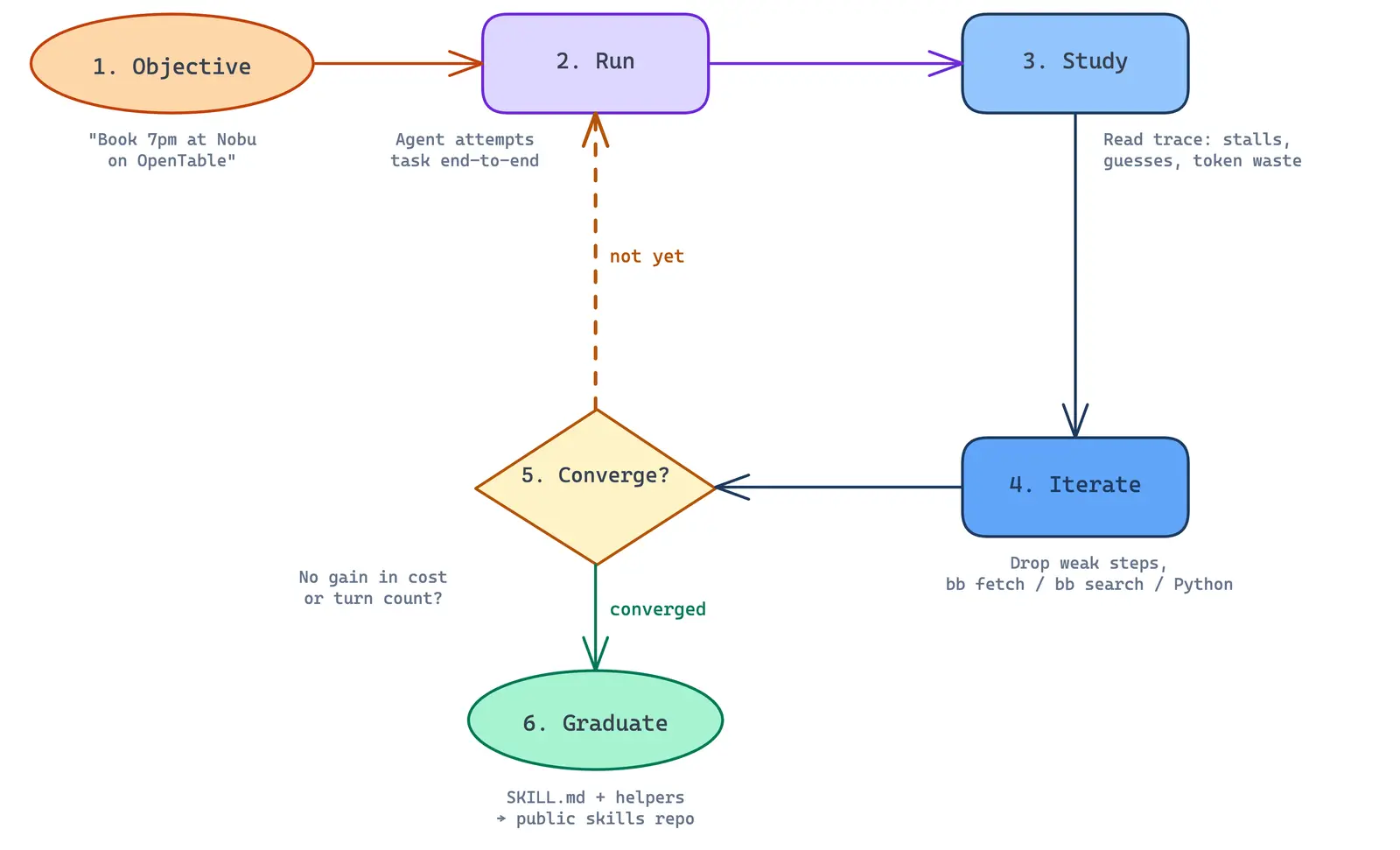
The core loop is simple:
- Objective. Hand the agent a real task on a real site ("book a 7pm dinner reservation at this restaurant on OpenTable").
- Run. Let the agent attempt the task end to end against a live browser.
- Study. The agent reads its own trace. Where did it stall? Where did it guess? Where did it spend tokens it didn't need to?
- Strategy. The run’s “outer loop” maintains a strategy.md file, basically a scratchpad where the agent dumps observations after each iteration (what worked, what broke, what to try next, what to stop doing). On the next iteration, the agent reads strategy.md first and uses it as context, so improvements compound instead of resetting every run.
- Iterate. Refine the strategy based on those notes. Drop steps that didn't pull weight. Lean on deterministic helpers (browse fetch, browse search, custom Python) wherever possible.
- Converge. Once consecutive iterations stop yielding meaningful improvements in cost or turn count, short-circuit.
- Graduate. Write out a SKILL.md plus any helper files into the public skills repo.
In practice, we cap iterations low (~ 3 to 5) and short-circuit aggressively. The goal is a reliable, cheap path that's good enough to be reused, (technically short of any theoretical global optimum).
The output?
What comes out the other side is a small, readable file. No transcript, no vector of embeddings, no screenshot reel. Just markdown (just skim this):
If the agent discovered an undocumented JSON endpoint, that endpoint is in there. If a particular form needs a small wait before submission, that's in there too. If a domain-specific helper (helpers/amazon.py, helpers/opentable.py, helpers/sf-portal.py) is worth keeping around, it gets checked in next to the skill.
This is the same shape we use inside bb, our internal generalist agent. In our post on how we build agents at Browserbase, we wrote about how every internal workflow (feature requests, session investigations, PRs, sales triage) runs through one agent that loads small markdown skills on demand. The general loop stays simple. The domain knowledge lives in skills, where it can be read, edited, versioned, and reused.
Autobrowse pushes that idea one layer further: the agent writes its own skill, learned by actually doing the task.
The hand-written skills inside browse and the Autobrowse-graduated skills inside the public Browse CLI ecosystem are, importantly, the same kind of artifact. Once a skill exists, nothing about how an agent loads or runs it cares whether a human or another agent wrote it.
What is it good at?
Autobrowse shines on sites that genuinely require exploration.
- Hidden or undocumented APIs that aren't visible from the rendered page but show up in network traffic.
- Heavy client-side rendering, where the "real" content only appears after a sequence of interactions.
- Multi-step login or wizard flows, where the right path isn't obvious from the first screen.
- Any UI where the shortest reliable path is non-trivial enough that a human reverse-engineering it would take a couple of hours.
- Token-saving opportunities where parts of the loop are redundant (e.g. skipping
browse screenshotwhen the UI isn’t changing meaningfully).
For example, we used Autobrowse to play around with a federal grants portal and surface an undocumented JSON endpoint that returned every current grant in a single call. What looked like a 28-page scrape collapsed into a single browse fetch, and that discovery is now baked into the graduated skill so we never have to re-find it.
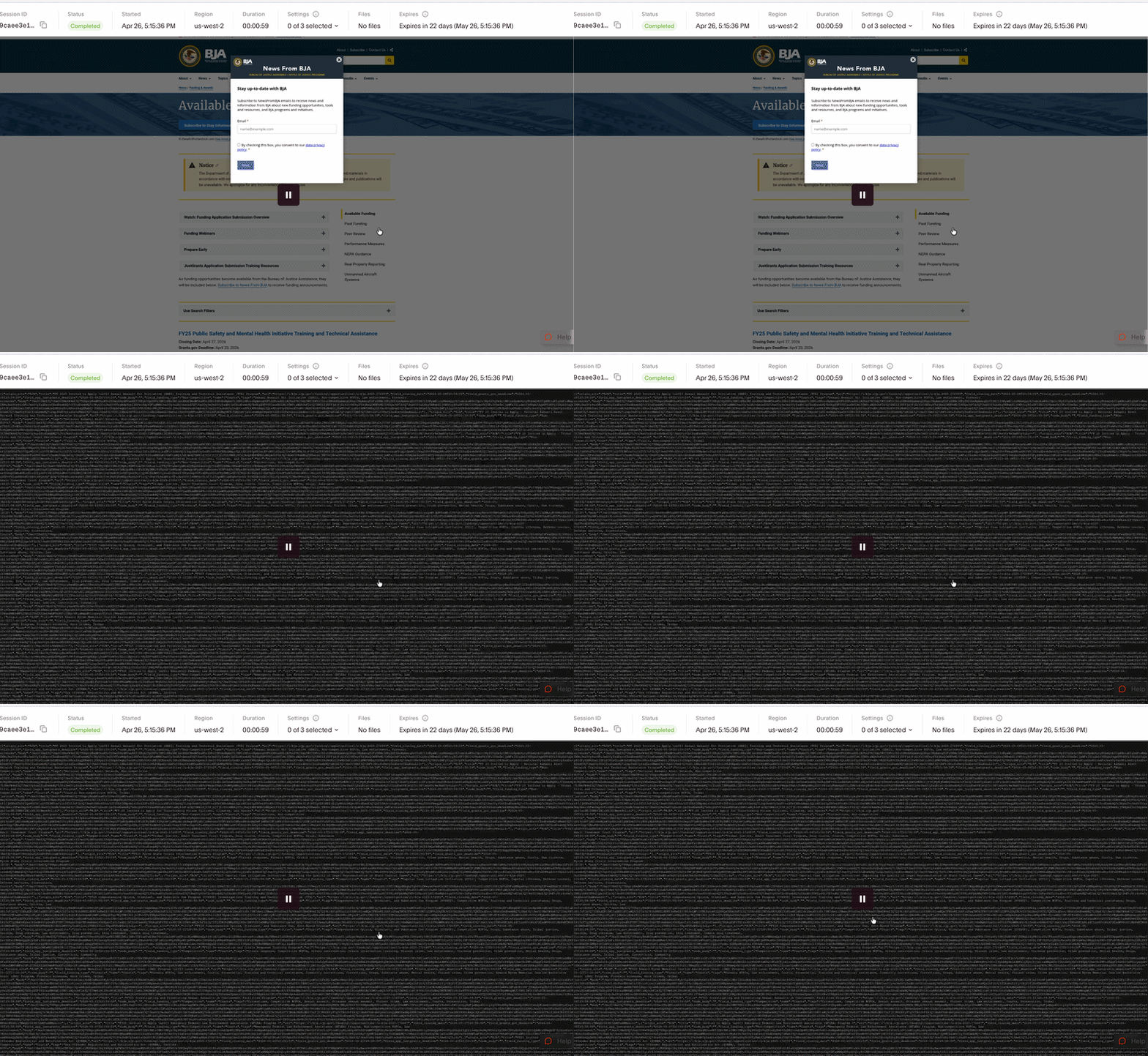
This is the recurring pattern that makes the whole approach worth investing in: an agent tries something a person never would, and finds something a person would never see.
A concrete benchmark: Craigslist
A clear internal benchmark we've shared so far is Craigslist.
Traditional Claude Code loop: ~$0.22, ~71s
Graduated Autobrowse skill: ~$0.12, 27s
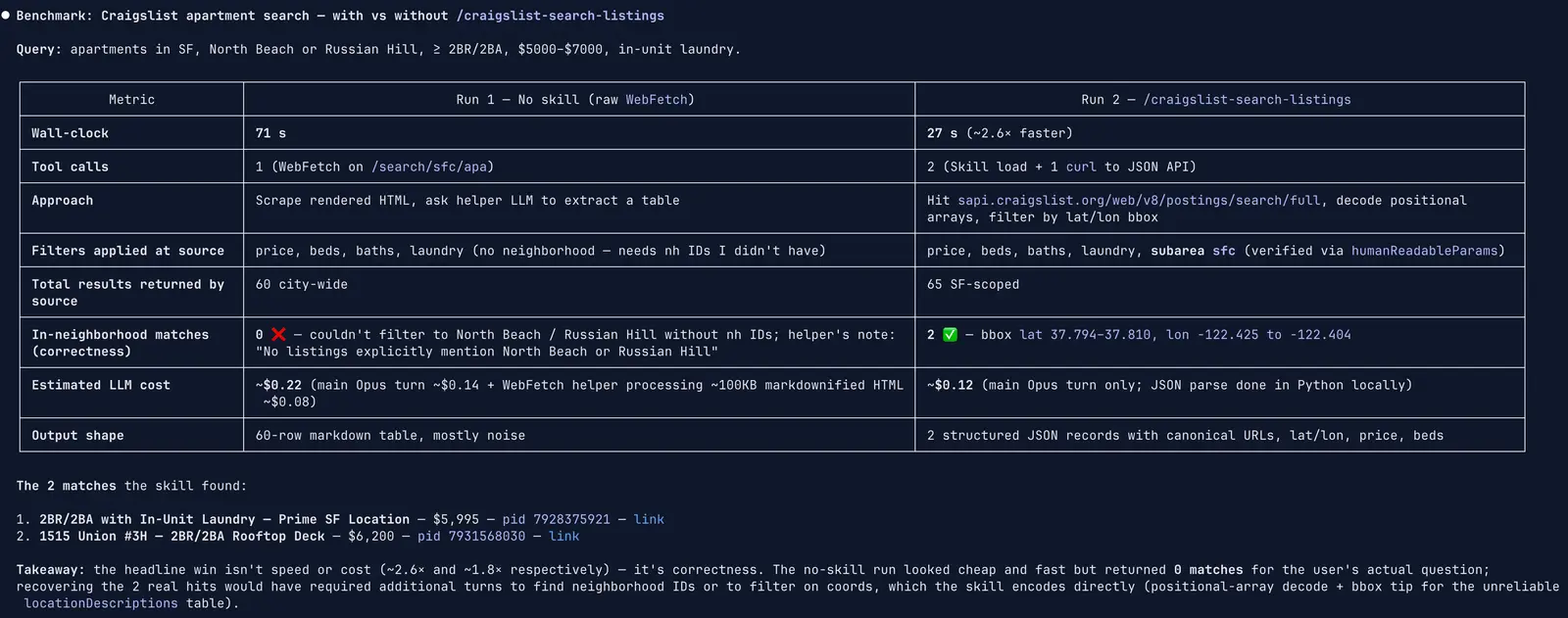
The shape matters more than the absolute numbers. The first run on the site costs about what you'd expect from a generic agent loop. The end skill changes the unit economics of every subsequent run by an order of magnitude or more, because it encodes the shortest reliable path the agent could find and reuses it instead of re-deriving it.
We see the same shape on smaller tasks. On an early form-fill experiment, cost dropped from $1.40/run to $0.24/run in four iterations, just by letting the agent notice and remove the parts of its own approach that weren't pulling weight.
Where Autobrowse breaks
It would be easy to oversell this. Autobrowse is genuinely strong on a specific shape of problem and genuinely the wrong tool on another. The discipline of not using Autobrowse is part of using it well.
Autobrowse is not the right tool when the task is deterministic parsing. We learned this the hard way against a 167-row static HTML state catalog. The data was right there in the markup. No JavaScript, no auth, no anti-bot, just rows.
We threw Autobrowse at it anyway, because the framing of "let the agent figure it out" is seductive. Four iterations and ~$24 later, the loop still hadn't returned all 167 rows in a single output. The model's per-turn output cap kept truncating its reasoning, and the iteration loop kept trying to be clever about a problem that didn't reward cleverness.
Once we recognized the regime mismatch, the agent pivoted to ~200 lines of deterministic Python with browse fetch and BeautifulSoup. Sub-second runtime, zero inference cost, all 167 rows surfaced.
The lesson got written into the skill itself:
Browser agents come in different agency levels, from a static script with no LLM in the loop, through router-style and tool-using agents, all the way up to fully autonomous loops that can spawn other agents and define their own tools. Choosing the right level is a real engineering decision.
Autobrowse sits at the high-agency end of that spectrum, and like any high-agency tool, you reach for it once the cheaper, more deterministic options have given up.
Why this changes workflows
A skill operates as a customer handoff, with all the weight that implies.
Today, when an agent succeeds at a job, the customer's engineering team gets a trace, maybe a session replay, maybe a paragraph of natural-language reasoning. None of those are legible to the people who actually own the workflow.
A skill is legible. It's durable, debuggable, human-auditable, and ownable. An engineer can read it, edit it, and commit it. A non-engineer (a technical PM, a VP of technology, a grants manager who knows their portal inside out) can also read it and roughly understand what the agent is doing without ever touching code.
We go from "just trust the agent's output" to "read the agent's playbook." That, in our view, is the thing that makes browser agents robust enough to live inside a serious enterprise workflow rather than awkwardly next to it.
The compounding effect matters too. Each new site an agent encounters yields one more durable skill. The library grows. The agent gets cheaper and faster on the long tail of repetitive workflows because it stops paying the discovery tax.
Autobrowse already functions as a factory for browser-agent capabilities, well beyond what any single agent could ship on its own. A single Autobrowse skill is useful. A growing public directory of them, accessible to anyone running a browser agent, is the actual prize.
What we're working on next
Smarter stopping
Right now we cap iterations at a small number and short-circuit when consecutive runs converge in cost and turn count. It's a reasonable heuristic, but a blunt one. We're letting the agent reason about its own convergence more explicitly, comparing not just cost and turns but the structure of its trace across runs.
Some of Autobrowse's most useful wins (like the federal-portal JSON endpoint) come from the agent randomly varying its approach and stumbling onto a much shorter path. We don't want to optimize that variance away too aggressively.
Better priors about how to explore
We want to make sure the agent reaches for our fetch and search primitives before spawning a full browser session. A lot of what looks like exploration can be answered with one fetch. For more advanced tasks, it’s reasonable to let the agent inspect browser traces, network events, and CDP logs so it can discover internal APIs by watching network requests rather than guessing at them from the rendered DOM.
Recursive Autobrowse
The most exciting direction is recursive: Autobrowse improving Autobrowse. Today the iteration loop, the convergence heuristic, and the skill template are mostly hand-crafted. The same way we use Autobrowse to graduate skills for individual sites, we can use it to graduate improvements to its own harness. Better prompts for the iteration step. Better priors for which primitives to reach for first. Better templates for what the final skill should look like for a given class of task.
The bigger picture
A dominant story about browser agents right now is that they'll get good when the underlying models get good. We're one Anthropic or OpenAI release away from agents that just work on the web. We don't entirely buy that.
Even a perfect model still has to discover (on every new site) what a perfect model would already know if it had been there before. Without a place to put what the agent learns, every run is a fresh start.
The real bottleneck is memory, in a form humans and agents can both understand and trust.
→ Kyle
Start building with Browserbase
Run headless browsers for your agents and automations at scale. Get started free in minutes.