
In generative AI, grounding is an essential technique for reducing hallucinations and improving the accuracy of an LLM's answers.
LLMs are trained on a vast amount of knowledge; however, that data is static and only updated during training, when a new LLM version is created. This static knowledge leads to hallucinations.
Grounding is achieved by providing tools to search or fetch external data, preventing LLMs from inventing answers when their knowledge falls short.
Modern AI products like ChatGPT, Claude, and Perplexity, along with coding agents like Claude Code, use web-grounding tools to search and fetch live data from the internet. The result is fewer hallucinations and more precise answers.
In this article, we’ll explore different grounding techniques, their use cases, and all the solutions available to implement web grounding in your AI application.
The different types of LLM Grounding
An LLM can ground its answer using a wide variety of data sources; the most common ones help in retrieving domain-specific or private information:
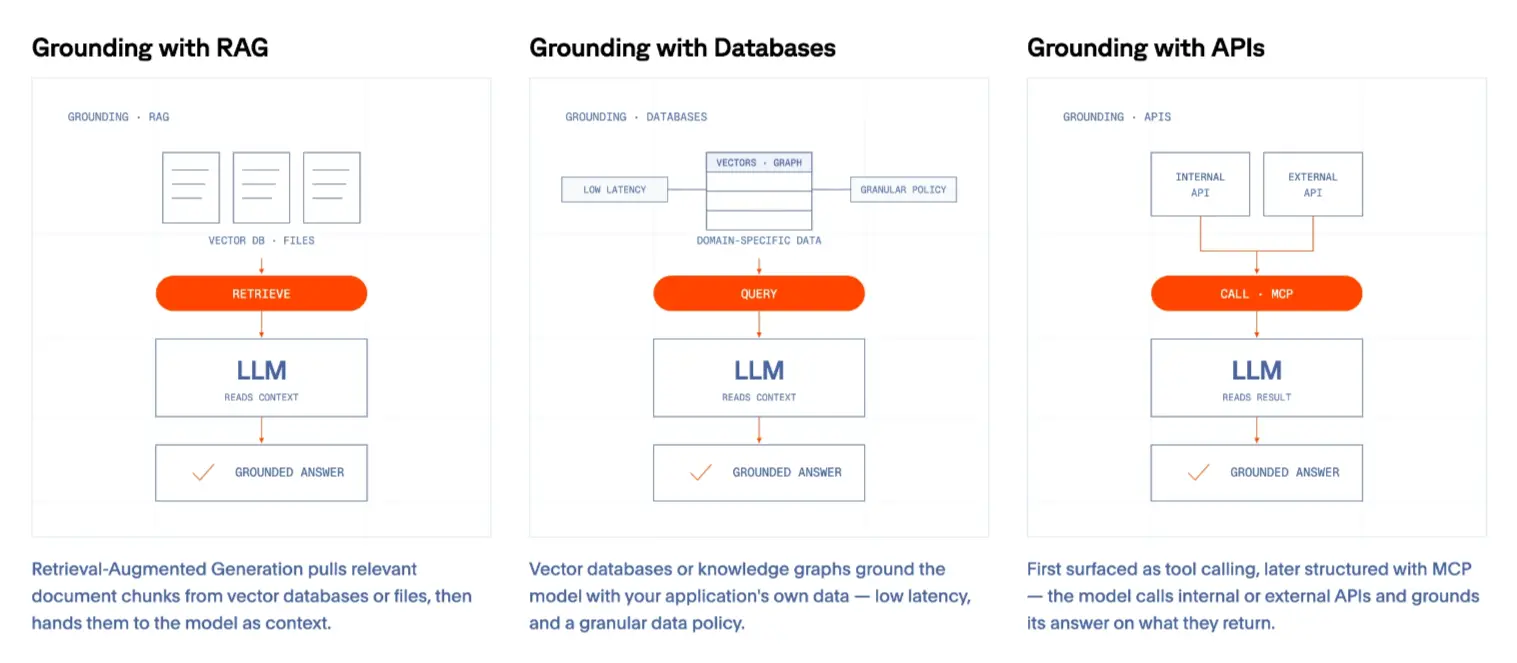
The three patterns above are crucial for grounding large language models (LLMs) used in chatbot development, retrieval-augmented generation (RAG) workflows, or AI agents. These are especially important in domains where sources are manually produced (such as RAG with PDF documents) or where integrations depend on existing provider APIs (e.g., Salesforce).
As artificial intelligence evolves, its applications are expanding into areas with limited APIs, driving demand for innovative solutions. Users now expect AI systems to offer a broader range of functionalities to address complex problems with flexible, open-ended goals.
This shift is putting web grounding at the center of any AI application with 2 main capabilities:
- Web Search grounding gives LLMs access to the whole web through a Search API, so they can discover useful sources to answer questions like “Who won the 2026 World Cup?”
- Web Fetch grounding lets an LLM pull a specific web page, or a set of pages, into its context for a more detailed answer. For example, checking booking availability for a groomer.
LLM Grounding using Web Search
Web Search grounding is essential for multiple widespread generative AI use cases:
- General agents and chatbots: Retrieve up-to-date information to produce more accurate answers.
- Coding agents: Find the best library, or documentation page for a given technical requirement.
- Research agents: Conduct in-depth web research across the whole web.
- Voice agents: Find relevant sources for low-latency voice interactions.
Web Search helps LLMs find trustworthy sources of information without restricting their knowledge area. Using RAG, databases, or API grounding would narrow LLMs’ knowledge to a finite, domain-specific dataset, leading to hallucinations when facing open-ended questions such as “best react pdf library” or “transformers latest research papers”.
What makes an effective LLM web search API?
A broad index. The API should cover the whole web, comparable to a major search engine, so the agent is never limited to a narrow slice of the internet.
Query understanding. Agents phrase requests differently than humans, so the API should turn the model's intent into an effective query instead of expecting a clean, human-style search string.
Ranked, structured results. Results should come back ranked for relevance and as structured data the agent can act on directly, not a page of HTML to parse.
Freshness. Results should be live, with no stale entries or dead links like a 404 page.
Speed and token efficiency. Agent experiences need to be fast, and the response should carry as few tokens as possible to keep the context window lean.
Browserbase Search API
Browserbase Search is available as an API with TypeScript and Python SDKs. It returns live, ranked web results built for LLM use.
Whole-web index. Search spans the whole web, so your agent can discover sources on any topic.
Structured, ranked output. Results come back as structured JSON, ranked for relevance and ready for the agent to act on.
Live, low-latency results. Every query hits the live web rather than a cached index, so the data is current.
Token-optimized. Each result carries the URL, title, and metadata rather than full page excerpts. The agent decides which pages are worth fetching, and the context window stays lean.
How to set up Browserbase Search to ground LLM answers
Install the SDK and set your API key:
Then call Search from the API directly:
or through the TypeScript or Python SDK:
See the Search API reference for the full list of parameters and response fields.
LLM Grounding using Web Fetch
Once an agent has found trustworthy sources, it needs to fetch content to further analyze it.
Reliably fetching data from any webpage is essential for various generative AI use cases:
- General agents and chatbots: Retrieve up-to-date information from a specific source.
- Coding agents: Pull the latest code snippets, best practices, and technical references.
- Research agents: Conduct in-depth web research across the whole web.
- Voice agents: Web retrieval to support real-time with quick fact-check for low-latency voice interactions.
- Vertical-specific agents: Pull fresh, domain-specific information tailored to a given industry or knowledge vertical.
- AI workflows: Regularly collect news, people, company, or other frequently updated information for internal or production workflows.
Effectively retrieving reliable data from any webpage for grounding LLMs involves addressing several challenges: web pages that utilize JavaScript for content rendering, those requiring user interactions, and pages protected by anti-bot technologies.
What makes an effective LLM webpage fetching API?
Freshness. The API should return the live page, not a stale or cached copy.
Speed. Fetching should be fast, since it often runs inside a latency-sensitive agent loop.
Token-optimized output. Returning markdown or structured JSON instead of raw HTML strips the boilerplate and sends the model content instead of layout.
Proxy support. Some pages block datacenter traffic, so the API should route requests through proxies to reach them.
Browserbase Fetch API
Browserbase Fetch is available as an API with TypeScript and Python SDKs. It reads a page and returns clean, model-ready content without spinning up a full browser.
Output you choose. Get raw HTML, token-optimized markdown, or structured JSON extracted against a schema you define, so the content arrives in the shape your agent needs.
Live retrieval. Fetch reads the current page, not a cached copy.
Content, not layout. Markdown output strips the boilerplate, so you send the model the content and not the page's markup.
Proxy support. Route requests through proxies to reach pages that block datacenter traffic.
How to set up Browserbase Fetch to ground LLM answers
Install the SDK and set your API key:
Then fetch any page as markdown or as structured JSON:
See the Fetch API reference for the full list of parameters and response fields.
Going further
Search and Fetch cover most grounding needs: find trustworthy sources, then read them fast and cheap. Some pages need more. When a page hides data behind a login, or requires clicking through steps, Fetch alone will not reach it.
That is where the rest of the platform comes in. The same API key that runs Search and Fetch also gives your agent full Browsers to navigate and act on any page, and managed Agents to orchestrate multi-step tasks across many sites. The pattern is to layer them: Search to find sources, Fetch to read static pages quickly, and a Browser or Agent only when a page genuinely needs interaction. Do as much as possible with the lightweight primitives, and reserve full browser sessions for the hard cases.
The web wasn't built for agents. Browserbase is: one API key to ground your agent on the live web, from a quick search to a full browser session.
Start building with Browserbase
Run headless browsers for your agents and automations at scale. Get started free in minutes.