




TL;DR We built Browse.sh, an open catalog of 100+ curated browser skills that any agent can install with one CLI command. Our Skills are durable, reusable playbooks that capture how to navigate real websites, so your agents stop re-discovering every site from scratch on every run. All of this is powered by Autobrowse, our system that uses AI to iterate on real tasks until it converges on the cheapest, fastest path. Open source, free, and ready to use today at browse.sh.
Over 100 skills. Zero re-learning. Your agent’s brain grew some grooves.
Browser Agents are everywhere right now, living in Claude Code, Cursor, and Codex. AI products are now shipping some version of "let the model drive a browser." And yet, every single one of these agents does the same dumb thing: it re-discovers every website from scratch, every time it runs.
Open a browser. Poke around. Find the button. Click it. Parse the response. Close the session. Forget everything, then do it all again tomorrow.
We've been building browser agents and infra at Browserbase for a while now. We've watched agents burn through tokens re-learning sites they've already conquered. We've watched customers painstakingly hand-write Playwright scripts for workflows an agent already solved last Tuesday. We've watched the same discovery tax get paid over and over, across thousands of sessions, by thousands of teams.
Today we're launching Browse.sh: an open catalog of browser skills that any agent can install and use immediately. 100 curated skills at launch and one CLI command to install.
What is Browse.sh?
Browse.sh is two things:
- A catalog of browser skills at browse.sh, where you can search, preview, and install curated skills for navigating real websites.
- The Browse CLI (npm i -g browse), the open-source command-line tool your agents use to actually drive browsers, fetch pages, search the web, and load skills on demand.
A "skill" is a markdown file (SKILL.md) plus any helper scripts needed to repeat a browser workflow reliably. It contains the exact steps, gotchas, API endpoints, selectors, and fallback strategies an agent needs to complete a task on a specific site. No vector embeddings or screenshot reels. Just plain text that humans can read and agents can execute.
It’s just like a playbook. An agent that loads the Craigslist skill doesn't need to spend 30 turns figuring out that the search page is fully JS-rendered and that there's a hidden JSON API at sapi.craigslist.org. That knowledge is already in the skill. The agent reads it, runs it, and moves on.
Why this exists
If you've shipped a browser agent into production, you know this shape intimately.
The first run on a new site is exciting. The agent wanders around, figures out the page, eventually completes the task. The second run looks almost identical. The hundredth run is depressing. By then you've paid for the same exploration a hundred times, the cost graph is a straight line going up, and you still don't have a clean artifact you can hand to a teammate and say "this is how we do this job."
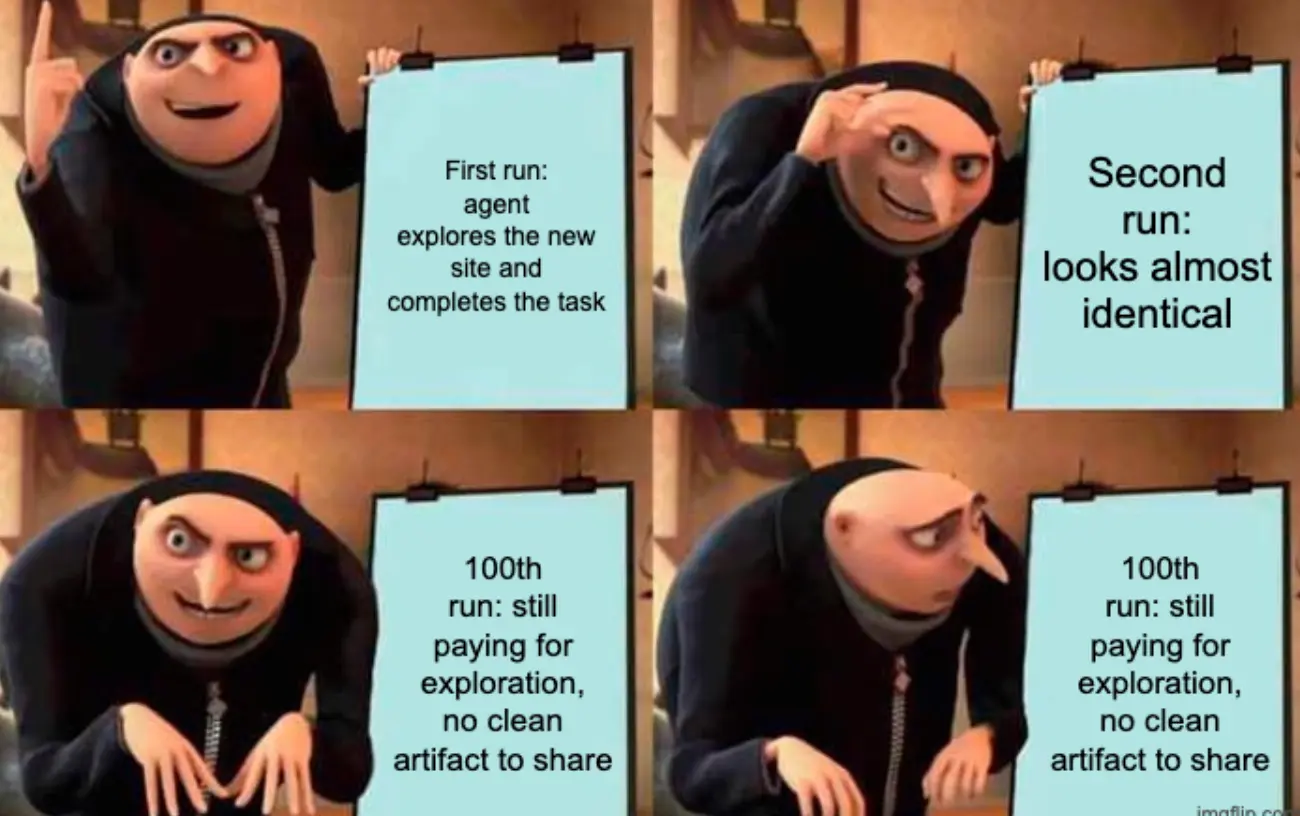
Reasoning has stopped being the constraint. Memory has become the bottleneck, in a form that humans and agents can both read and trust.
The unit economics are brutal
We benchmarked this on Craigslist. A generic agent loop searching listings costs ~$0.22 per run. The agent has to discover that the search page is fully JS-rendered, stumble onto the hidden JSON API at sapi.craigslist.org, figure out the positional array decoding, learn that item[0] is an offset (not the posting ID), and work around IP-based geo-scoping. Every run pays that discovery tax from scratch.
After four Autobrowse iterations, the graduated Browse.sh skill does the same job for ~$0.12 per run. The 45% cost reduction comes from better memory.
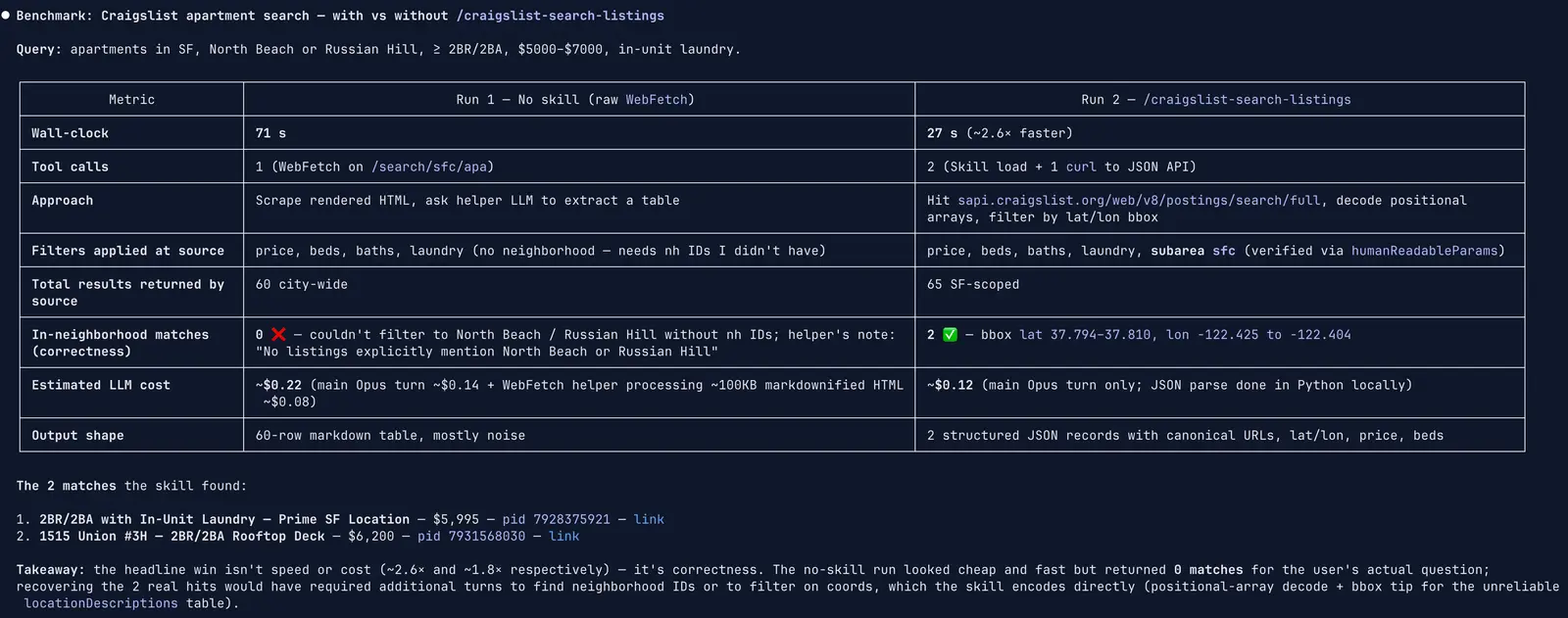
Every subsequent run after the first is fundamentally cheaper because the skill encodes the shortest reliable path the agent could find (the undocumented endpoint, the decode tables, the geo-override hack) and reuses it instead of re-deriving it. At scale, this is the difference between a cost curve that flatlines and one that compounds against you.
Skills are the new primitives
The industry is converging on this. Claude Code ships with skills. OpenAI Codex supports them. The AgentSkills standard is gaining traction. Every major agent framework is adding some version of "load a markdown file that tells the agent how to do a specific thing."
Browser skills are the natural next step. The web is messy: sites render differently for different user agents, gate content behind JavaScript, hide data behind undocumented endpoints, throw CAPTCHAs on a whim, and redesign their flows on a Tuesday. A generic agent loop copes with all of that in the moment, then forgets everything once the session closes.
Browse.sh captures what the agent learned, so the next agent (or the next teammate, or the next customer) doesn't have to learn it again.
How it works
Install the CLI
That's it.
Browse a skill
Head to browse.sh and search for the site or task you need. Each skill page shows what the skill does, how it works, site-specific gotchas, and the install command.
Install a skill
This pulls the skill into your local skills directory. Your agent can now load it on demand.
Use it in your agent
Point your agent at the skill and let it run. The skill provides the playbook; the agent provides the reasoning. A typical prompt looks like:
The agent reads the SKILL.md, follows the workflow, handles edge cases using the documented gotchas, and returns structured results.
Verify it yourself
Quick check: does the CLI see your installed skills?
What's inside a skill?
Every skill graduates from Autobrowse, our system that uses AI to improve AI. You give an agent a real task on a real site. It runs the task end to end, studies its own trace, iterates on its strategy, and keeps going until the workflow becomes reliable rather than lucky. Once it converges, it writes out a durable skill.
Here's what that looks like in practice. This is a real excerpt from our Craigslist skill:
This is the kind of knowledge that takes a human engineer a couple of hours to reverse-engineer, and an agent dozens of dollars in tokens to discover from scratch. Once it's in a skill, it's free forever.
If the agent discovered an undocumented JSON endpoint, that endpoint is in there. If a particular form needs a small wait before submission, that's in there too. If a domain-specific helper script is worth keeping around, it gets checked in next to the skill.
What shipped?
We're launching with 100 skills spanning:
- Marketplaces: Craigslist, Zillow, Amazon, eBay
- Food & dining: OpenTable, DoorDash, McDonald's online ordering
- Travel: flight search, hotel booking, Airbnb
- Government: federal grants portals, state program catalogs
- Developer tools: GitHub, npm, documentation sites
- Enterprise SaaS: via partner integrations
Each skill is tagged with a category, verified status, and the site it targets. Partner skills from companies like Ramp, Lovable, Poke, and Reducto ship with a verified badge.
Generate your own
Don't see the skill you need? Type any domain and task into browse.sh, and Autobrowse will generate a skill for you. It runs the task against the live site, iterates until it converges, and publishes the result to the public catalog for anyone to use.
Every new skill makes the catalog more valuable, which brings more users, who generate more skills.
Who is this for?
More specifically:
- AI engineers building agents that automate web workflows (QA, data extraction, form filling, monitoring).
- Product teams shipping browser-based features who want deterministic, auditable playbooks instead of black-box agent runs.
- Platform teams looking to reduce token spend and latency across their agent fleet.
- Anyone using Claude Code, Cursor, or Codex who wants their coding agent to browse the web with pre-built expertise.
The Vision
A dominant story about browser agents right now is that they'll get good when the underlying models get good. We're one Anthropic or OpenAI release away from agents that just work on the web.
We don't entirely buy that.
Even a perfect model still has to discover, on every new site, what a perfect model would already know if it had been there before. Without a place to put what the agent learns, every run is a fresh start. The models will keep getting better. The web will keep getting messier. The gap between "can reason about a page" and "knows the fastest path through this specific site" will persist.
Browse.sh is that place. One CLI. A growing catalog of skills. Memory that compounds.
We built this because we believe the real unlock for browser agents isn't better reasoning. It's better memory, in a form that humans can audit and agents can execute.
Install our CLI with:
And find or create the skill you need at browse.sh.
The bottleneck for browser agents was never intelligence. It was amnesia. Browse.sh is the cure.